

Two years ago, we experimented with using iPad for check-in. It worked well, but it didn’t seem like it’s something that would work every week. Fellowship One, the software we use for check-in, doesn’t have a mobile app, so to make it work on an iPad requires being creative. Two years ago, we used a remote desktop client that essentially allowed the iPad to take control of a check-in station. Having the iPad didn’t “add” a check-in station, but essentially replaced one.
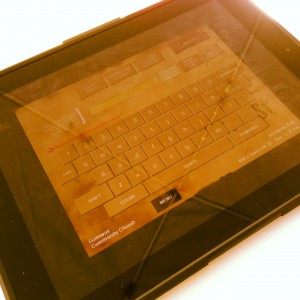 This is the time of the year when our crowds get pretty crazy, so we decided to beef up our check-in. We placed two new check-in stations that we hadn’t started using yet and put them in a central location in our lobby. We used two iPads using the “Real VNC” app for the iPad. We installed “Real VNC” on the two computers and from there, it was piece of cake. Each iPad took control of of the check-in station. We put one volunteer at the printers to manage the labels. We had two volunteers in the courtyard with the iPad catching families before they entered the kids building. Parents were pleasantly surprised and enjoyed getting checked in outside, avoiding any kind of line.
Again, I’m not sure it’s a long term fix as it required a computer that can’t be sued for anything but supporting an iPad. However, I have a volunteer working on a better solution. One computer that could run 3-4 session of widows at once, sharing one printer. This setup would allow many iPad to connect to one computer. We haven’t tried it yet, but we’re interested in seeing if it works. That would be a good solution for iPad check-in. Otherwise, using Fellowship One on the iPad is more of a novelty at this time… just not quite worth the effort.













I’ve wanted to build that Check in app for over 2 years now. You may have just pushed me over the edge.
Do it! I dare you!
Kenny, I know you are a Fellowship One user, but Lambslist allows multiple iPads to be connected to one PC/printer like you are talking about.
Yeah… still somewhat of a “fix” but I’m glad that works. I’ve heard good stuff about lambslist… especially if you just need quick and reliable check-in… have recommended it to people who needed an affordable and quick solution that didn’t involve a church-wide database.
Per Fellowship One support, the Check-in module will be replaced in the next few weeks/months with a web-based platform so it can be used via “Anything that browses the web” Still not sure how to overcome the obstacle of printing via the iPad unless Zebra/godex figures out AirPrint.
Hi Brandon,
If you go to the web app you’re talking about, just get a network zebra printer. Have your web server print to the zebra printer that sits next to the iPad. The iPad doesn’t need to know how to print, your server does. The user experience is the same but it’s more reliable than AirPrint.
Yeah… someone sent me a link last week to Zebra print server… which I guess this might work, huh? I heard from someone else recently that F1 was going to update their check-in to something on the web. Once that goes live, we may look at the iPad as a permanent solution then… I’m excited!
We (Willow Creek Community Church) are in the process of developing two apps to handle our checkin. One will be the actual iPad app where people will be able to hold a bar-code card up to the iPad’s camera to check their children in. Each station will have a networked Zebra printer. We will also have ‘roaming’ ipads so that volunteers can check people in the lobby area. The second app is the Room Report app. Once the child makes it into the room, they will be ‘checked in’ there in case of emergency evacuation. That app will also have the health notes for children. Checking in two kids at the self-checkin iPad takes comes is under 8 seconds (right now it can take up to 10 minutes!). We will be launching this at a regional campus in a few weeks before moving it to our main campus. We are excited to see the results!
K.C., have you completed your app for checkin? How’s it working. Have you considered making the app available on the App Store? If so, i would be a customer. What are your thoughts there? Thanks in advance.
Is there a way to use Google Docs forms and iPad together for a check-in station?? This is my current tech question for KidMin.
I’m not sure I understand your question. Yes, you can use google docs on the ipad… but it is a little clumsy… imo. Are you using something like google docs to track attendance? If you’re going really simple… I would think you could use some kind of a checklist where you already have everyone’s names and you just check the box by their name… but I’m not sure what I’d use. I’m assuming you’re not using a dedicated check-in software, right?
We use a newer church database system- BVCMS- we currently run several check-in stations routed to one pc laptop. It has been great on all fronts from PRICE, to admin, to groups & check-in! We highly recommend it!
to clarify- several iPad check in stations. It can print 2 families of tags every 10 seconds.
We are getting ready to make the jump to Fellowship One, but we are needing some help on the hardware side with Self Check In.
We are wanting to us an iPad to do this (or a tablet if we have to). Do you have an update on technology that you are using for this and/or how I can go about setting this up?
Evan, I’ll know in a month. We just totally upgraded all of our check-in equipment and we’re going to be doing tablet check-in. We have a few bugs to work out, but it looks like it’s going to work. Again, I’ll know in a month. Got to test out the new equipment.
Ok… almost sold on fellowship one check in but this is the only draw back… no Ipad check in capability. Any news would be helpful.
Have you checked out Roll Call’s check-in. You can check in with an iPad or any tablet. Printing is done through a brother wireless printer
We are a new church plant with only a few kiddos. We’re thinking of purchasing an iPad to use for check-in. What program do you suggest for such a small project? We were hoping to just use the iPad and not have any other “stations” or computers. Do you have any suggested apps or programs?