Tag Archives: Sync

App of the week: Firefox Home

Posted on 20. Jul, 2010 by .

1

So I just found a killer new app. It’s called Firefox Home. I’m a pretty big fan of Firefox and it’s my default browser. I don’t know if any of you are like this, but I’ve got tab issues. I like to have lots and lots of tabs open at the same time. When I say lots of tabs, I really mean A LOT of tabs. It’s a problem I certainly need help with, but that’s a different blog post.

So, have you ever been on your iPhone and you can’t remember a site you need to go to that you even have bookmarked on your computer at home? Maybe that page is even open on your computer at the office right now. Wouldn’t it be great to actually easily pull up that page you were looking at yesterday on your home computer  on your iPhone? Well, with Firefox Home, you can and it’s pretty impressive.

You have to enable the Firefox Add-On “Firefox Sync” and setup an account. With this Firefox Add-On, you can sync your tabs, history and bookmarks across computers. With the Firefox Home iPhone app, you can have access to all of that data right on your phone. It’s absolutely beautiful!

So, it’s really simple. One page is dedicated to search. Type in any term that may have been on a page you were viewing in the past few weeks and you’ll be quickly given open tabs, history and bookmarks that contain that term. Another page is dedicated to tabs. The tabs are in a list. See one that interests you and it opens up. One more page is dedicated to your bookmarks. I don’t really use bookmarks anymore (which I think is why I have so many tabs open), but they’re all there. The settings page will allow you to sign in and out of your sync account and give you an overview of how many tabs you have open, how many bookmarks you have or how many pages you have indexed in your history.

Just to clarify though. This is not Firefox on the iPhone. Any tab, bookmark or indexed page you click on will simply open that page in a Safari browser within the Firefox Home app. I guess it’s the next best thing to having Firefox on your iPhone.

So, if you use Firefox (and you should) and you have an iPhone, download this free app today.

BTW, I’m laying down another preemptive ban on Smart Alec comments from Jonathan Cliff on how many tabs I have open. This is starting to become a regular thing here.

Continue Reading

Syncing Google Calendar and Contacts with your iPhone

Posted on 14. Oct, 2009 by .

3

Screen shot 2009-10-14 at 2.27.45 AM

So yesterday I officially switched my work mail to Gmail. I was tired of putting up with Entourage and even more frustrated with my inability to share my work calendar with my wife who manages her/our calendar with Google Calendar. Using Gmail as a catch all account is taking a little bit of an adjustment, but I really like it so far. I need to develop a system with labels and filters, otherwise I think I might drown.

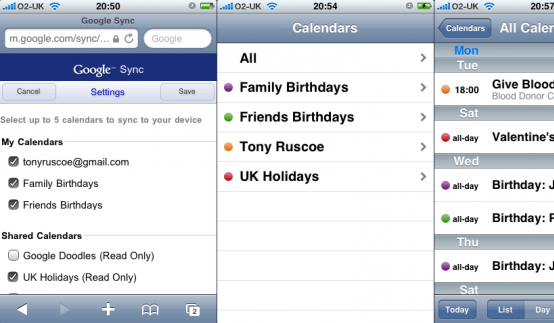
Now that I’m using Gmail, my only calendar is my Google Calendar. However, I wanted to make sure that the calendar on my iPhone syncs with Google. I learned how to do this when I gave my wife my iPod touch.

Go to NuevaSync and create a free account. NuevaSync is an online service that will connect your Google accounts with your iPhone (or other phones as well) by pretending to be an exchange server. It’s really easy to set up and it’s completely free. Within a few minutes, my calendar and contacts were synced. Push email (through Gmail) and the ability to sync up to 50 calendars is available at a very low price as well. I already bring in my Gmail into my iPhone, so I didn’t see the need to pay for anything.

So, if you use Google Calendar and would prefer to sync your iPhone (or several other smart phones for that matter) to this calendar, check out NuevaSync.

Continue Reading